Best IPTV Player for Android: Apps, Setup, and the Service Behind Them
TiviMate, IPTV Smarters Pro, XCIPTV, and Televizo compared honestly — plus the Watchit subscription that fills any of them with 22,000+ live channels and 80,000+ movies and series.
- Works on phones, tablets, Android TV, Nvidia Shield
- One login powers any player app you pick
- 24-hour free trial before you commit
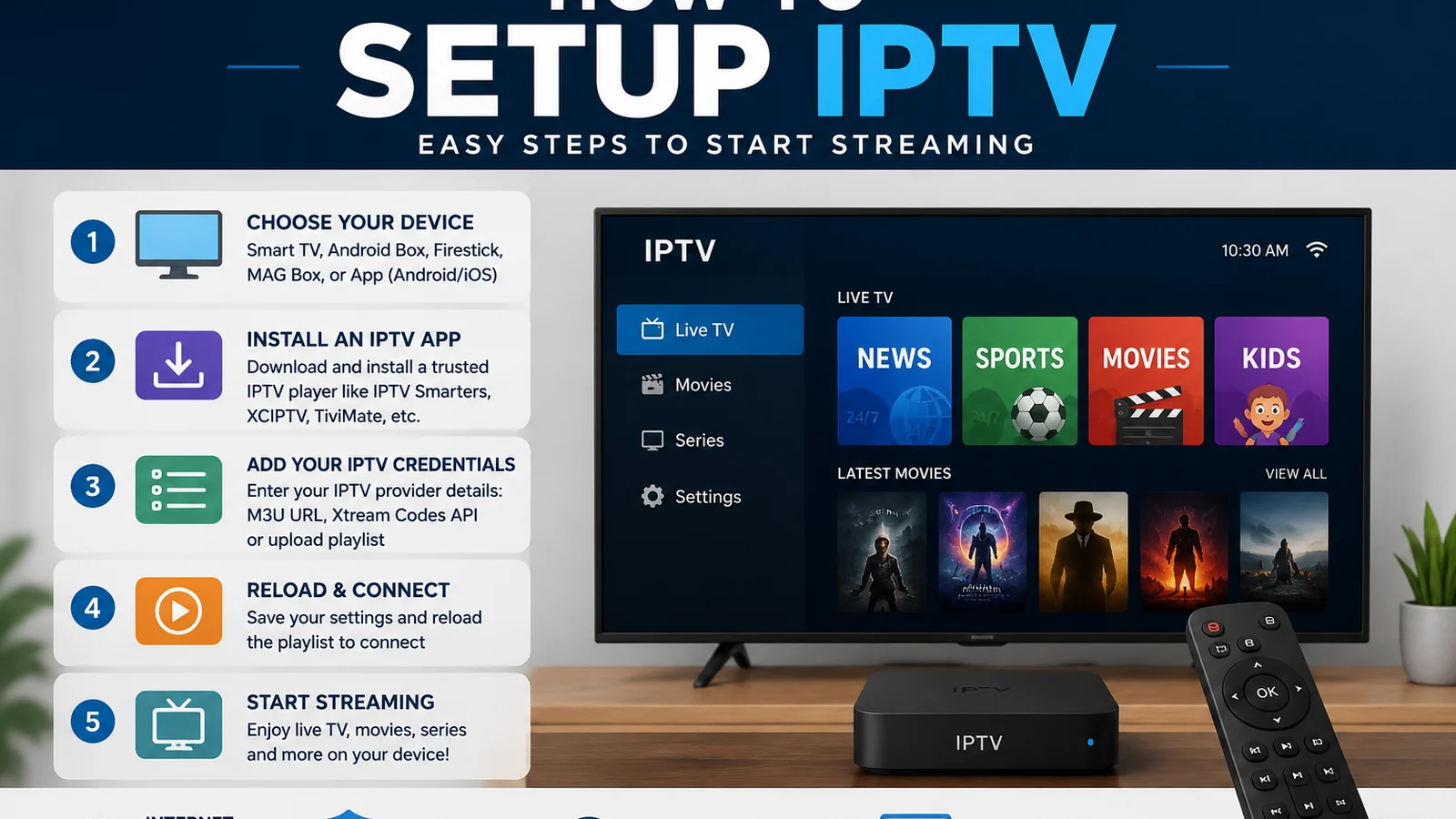
The best IPTV player for Android depends on which screen you hold: TiviMate dominates on Android TV, IPTV Smarters Pro is the safest all-rounder, XCIPTV rewards tinkerers, and Televizo wins on phones. But here is the part most app roundups skip — every one of those players installs empty. They are remote controls waiting for a signal. The signal is an IPTV subscription, and that is where Watchit comes in: one set of credentials that loads 22,000+ live channels and 80,000+ movies and series into whichever app you prefer, on any Android device you own.
What You Get Streaming Watchit on Android
Android gives you app freedom; Watchit gives those apps something worth watching. Together they cover every screen in the house.
Every Android Form Factor
Phones, tablets, Android TV sets, Nvidia Shield, Chromecast with Google TV, and generic TV boxes all run the same Watchit login — pick the device that fits the room and the moment.
Your Choice of Player
Watchit uses standard Xtream Codes and M3U formats, so it loads into TiviMate, IPTV Smarters Pro, XCIPTV, Televizo, or any compliant player. Switch apps anytime; your channels follow.
22,000+ Live Channels
News, sports, movies, entertainment, kids, and international categories stream in 4K and FHD where available, organized into groups your player app turns into a clean, scrollable guide.
Anti-Freeze Servers
Watchit's infrastructure is tuned for sustained live streams, so a Saturday game or a movie night on your Shield holds its bitrate instead of dissolving into a buffering wheel.
24/7 WhatsApp Support
Stuck on a login screen at 11 p.m.? Message support on WhatsApp and get walked through the fix — playlist URLs, EPG links, and app settings included — any hour, any day.
Set Up Watchit on Any Android Device in Four Steps
No technical skills needed. Pick a plan, receive your login credentials by email, and start watching on any device.
Grab your credentials
Order a plan or the 24-hour free trial and Watchit sends your username, password, and server URL by WhatsApp or email — usually within minutes.
Install a player app
On a phone or tablet, get IPTV Smarters Pro or Televizo from the Play Store. On Android TV or Shield, TiviMate from the Play Store is the strongest pick.
Log in with Xtream Codes
Choose the Xtream Codes API login option, enter your username, password, and server URL exactly as sent, and the app pulls in every channel group and the VOD library.
Load the EPG and organize
The program guide populates automatically in most apps; give it a minute on first sync, then build a favorites list so your daily channels sit one click away.
Why Android Streamers Pick Watchit
Player apps come and go — your subscription is the part that has to be reliable. Watchit pairs a deep channel lineup with stable servers, standard login formats every Android app understands, and a trial that lets you verify all of it on your own device before spending a dollar.
- Xtream Codes and M3U support for any Android player app
- 4K and FHD streams where available, with anti-freeze delivery
- Plans from $25 for 3 months — $70 covers a full year
- Multi-Screen plan runs 3 devices at once for households
- EPG guide data included, ready for TiviMate-style grids
- PayPal, credit card, or crypto at checkout
Pick Your Player — We'll Supply the Channels
TiviMate, Smarters, XCIPTV, or Televizo: one Watchit login fills any of them with 22,000+ live channels and a full VOD library.
Top Android IPTV Player Apps Compared (2026)
| Features | Feature | TiviMate | IPTV Smarters Pro | XCIPTV | Televizo |
|---|---|---|---|---|---|
| Best on | Android TV / Shield | Phone, tablet & TV | TV boxes & tinkerers | Phones & tablets | |
| EPG grid quality | Outstanding | Good | Good | Very good | |
| Xtream Codes login | Yes | Yes | Yes | Yes | |
| Catch-up support | Yes (premium) | Yes | Yes | Yes | |
| Multiple playlists | Premium only | Yes | Yes | Premium | |
| Premium cost | ~$10/year | Free core app | Free | One-time ~$7 | |
| Phone-friendly UI | TV-focused | Yes | Yes | Yes |
Choose Your IPTV Plan
Simple, transparent pricing. Every plan includes the full channel lineup, the VOD library, and 24/7 support. Cancel anytime.
3 Months
The easy way to try premium IPTV without a long commitment.
$45 Save 44%
Get 3 Months- 22,000+ live channels
- 80,000+ movies & series (VOD)
- Full HD and 4K where available
- Works on 1 device at a time
- Anti-freeze servers and EPG guide
- 24/7 support on WhatsApp
6 Months
The balanced pick if you watch TV every day.
$80 Save 44%
Get 6 Months- Everything in the 3-month plan
- Priority anti-buffering streams
- Premium channels in 4K and Full HD
- Works on 1 device at a time
- Free updates and catch-up TV
- Fast 24/7 support
12 Months
The lowest monthly price. Our most popular plan.
$140 Save 50%
Get 12 Months- Everything in the 6-month plan
- The lowest price per month
- 22,000+ channels in 4K/FHD
- Premium anti-freeze network
- Multi-device ready
- VIP priority 24/7 support
Still not sure? Start a free trial before you buy.
Why Android Is the Most Flexible Platform for IPTV
Android is the only mainstream platform where IPTV feels like a first-class citizen rather than a workaround. The Google Play Store carries dozens of dedicated IPTV players, sideloading an APK takes about ninety seconds when an app is distributed outside the store, and external video engines like ExoPlayer and VLC can be swapped in when a stream misbehaves. Compare that to closed ecosystems where you take whatever player the platform allows and hope it handles your playlist format.
The hardware range matters just as much. A $30 Android TV box, a Chromecast with Google TV, a flagship Nvidia Shield Pro, a Samsung Galaxy phone, and a $150 tablet all run the same apps and accept the same Xtream Codes login. That means one subscription strategy covers your living room, your bedroom, your commute, and your kid's tablet — with zero re-learning between devices.
Android also keeps you in control of the experience. You choose the guide layout, the buffer size, the decoder, and the app itself. If a player update breaks something, you install a rival and paste in the same credentials. That freedom is exactly why this page covers apps first and the service second — you need both, and Android lets you optimize each independently.
Best IPTV Player Apps for Android in 2026 (TiviMate, IPTV Smarters, XCIPTV, Televizo)
Four players consistently rise to the top of the Android pile in 2026, and each earns its spot for a different reason.
TiviMate — the Android TV benchmark
TiviMate is built exclusively for the 10-foot interface: a fast, dense EPG grid, smooth channel zapping, and recording and catch-up in the premium tier (roughly $10 per year, covering up to five devices). It deliberately skips phone layouts — install it on a handset and the TV interface fights your thumbs. On a Shield or Android TV set, nothing else matches its polish.
IPTV Smarters Pro — the versatile all-rounder
IPTV Smarters Pro runs well on phones, tablets, and TVs alike, with a clear split between Live TV, Movies, and Series sections and painless Xtream Codes login. It is the app Watchit support recommends first because setup rarely goes wrong — our full IPTV Smarters Pro setup guide walks through every screen.
XCIPTV — for tinkerers
XCIPTV lets you switch between ExoPlayer and VLC engines per stream, reskin the interface, and fine-tune buffering — handy on budget TV boxes where the default decoder struggles with high-bitrate channels.
Televizo — the phone specialist
Televizo is lightweight, ad-light, and fast on handsets, with an excellent compact EPG. A one-time payment of around $7 unlocks the full feature set, making it the cheapest premium option here.
Player App vs IPTV Service: Why You Need Both
Here is the fact that trips up almost every first-time Android IPTV user: none of these apps includes a single channel. TiviMate, IPTV Smarters Pro, XCIPTV, and Televizo are all empty shells on install. They exist to organize and play content delivered by an IPTV service — which is a separate product you subscribe to independently.
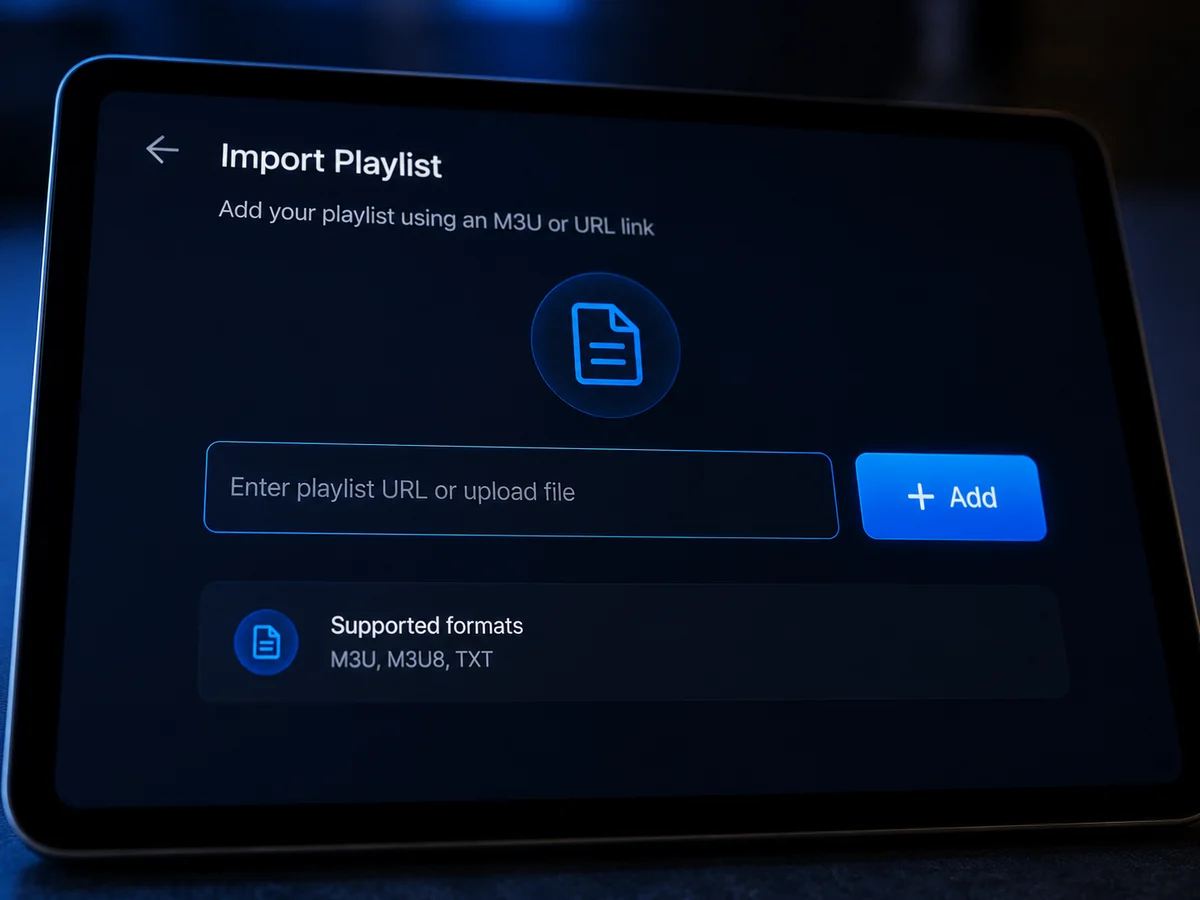
Think of it like email. Gmail's app is free, but it displays nothing until an account is connected. The player app is your interface; the IPTV service is your content pipeline. The two connect through credentials — typically an Xtream Codes username, password, and server URL, or an M3U playlist link — that the service issues when you subscribe.
This split is actually good news. It means a bad app choice costs you nothing: uninstall it, install another, paste the same credentials, done. It also means app reviews complaining that “there are no channels” are simply users who missed this step. What you should evaluate carefully is the service side — channel depth, stream stability, support responsiveness, and honest pricing — because that is the part you pay for. When you are ready to pair a player with a real lineup, you can buy an IPTV subscription and have credentials on your phone within minutes.
Watchit: The Best IPTV Subscription for Android Devices
Watchit is built around the exact standards Android players expect. Every plan ships with Xtream Codes API access, which means one-screen login in TiviMate, Smarters, XCIPTV, or Televizo — plus an M3U link for players that prefer playlists. There are no proprietary apps to trust and no lock-in: your credentials are portable across every player on this page.
The lineup covers 22,000+ live channels across news, sports, movies, entertainment, kids, documentary, and international categories, alongside 80,000+ movies and series on demand — browse the full category breakdown on our IPTV channel list. Streams run in 4K and FHD where available, delivered from anti-freeze servers designed to hold quality during peak evening hours; the premium 4K tier is where a Shield's Dolby-capable hardware really earns its keep.
Pricing stays simple: $25 for 3 months, $45 for 6, $70 for 12, and a $140 Multi-Screen plan that runs 3 simultaneous streams for a year. Standard plans work on one device at a time — you can install Watchit on your phone and your TV, just stream on one at once. Support runs 24/7 over WhatsApp, and the 24-hour free trial exists precisely so you can test all of this in your own player, on your own Wi-Fi, before paying.
How to Set Up Watchit on Android (Phone, Tablet, Android TV)
The four-step process above covers the basics; here is what changes per device type.
Android phones and tablets: install IPTV Smarters Pro or Televizo from the Play Store, choose “Login with Xtream Codes API,” and type your credentials carefully — the server URL must include the port number exactly as sent. Landscape mode gives you the full EPG; portrait works fine for channel lists and VOD browsing.
Android TV and Google TV: install TiviMate from the Play Store on the TV itself. On first launch, add a playlist, select Xtream Codes, and enter the same three fields. TiviMate downloads channel groups and EPG data in one pass; the first sync takes a minute or two on a large lineup, then subsequent launches are instant.
Generic TV boxes without Play Store certification: some cheap boxes ship without Google certification, so certain apps are missing from their store. In that case, download the player's APK from its official site and install it via a file manager — enable “install unknown apps” for that file manager first.
One tip that prevents most support tickets: copy-paste credentials instead of typing them on a TV remote. Use your phone to log in first, confirm they work, then transfer to the big screen.
Splitting devices across ecosystems? The Apple TV setup guide covers the other half of the household.
Best IPTV Setup for Nvidia Shield and Android TV Boxes
If you want the definitive Android IPTV machine, the Nvidia Shield TV Pro remains the answer in 2026. Its Tegra X1+ chip and 3GB of RAM chew through dense EPG grids that make cheaper boxes stutter, its AI upscaler visibly sharpens FHD streams on 4K panels, and Dolby Vision and Atmos passthrough mean premium streams reach your soundbar intact. Pair it with TiviMate premium and Watchit's Xtream login and you have a setup that boots to a full channel guide in seconds.
The standard Shield (tube model) delivers the same streaming performance for less, trading the Pro's extra RAM and USB ports. Either one outclasses generic boxes for longevity: Nvidia has a long track record of multi-year software support, while $30 no-name boxes often ship with outdated Android and never see an update.
That said, a budget box can be a perfectly rational choice for a guest room or garage TV. Look for at least 2GB of RAM, Android TV 10 or newer, and Google certification so the Play Store works properly. Our best IPTV box guide ranks the current options by budget. Whatever the hardware, wire it with Ethernet where possible — a cable removes the single biggest variable in live-stream stability.

IPTV on Android Phone and Tablet: Streaming on the Go
A phone turns your Watchit subscription into a pocket TV — morning news over coffee, a game from the bleachers of your kid's practice, a series episode on the train. The apps that shine here are the ones designed for touch: IPTV Smarters Pro and Televizo both offer swipe-friendly channel lists, picture-in-picture so a stream keeps playing while you answer a text, and Chromecast buttons for flinging the stream to a nearby TV.
Tablets split the difference between phone and TV. A 10-inch screen displays a genuinely usable EPG grid in landscape, making a tablet on a kitchen stand a legitimate second TV. Both apps remember your favorites and last-watched channel across sessions, so the experience stays continuous.
Remember the device policy: standard Watchit plans stream on one device at a time, so watching on your phone means the living-room TV waits its turn. For households where the phone and the TV genuinely run simultaneously — one person watching news upstairs while another streams a match downstairs — the Multi-Screen plan covers 3 concurrent streams under one account, which works out cheaper than juggling separate subscriptions.
EPG, Favorites, and Multi-Playlist Features Explained
Three features separate a frustrating IPTV setup from one that feels like polished cable — and all three live in the player app, powered by data your service supplies.
EPG (Electronic Program Guide): this is the scrolling grid showing what is on now and next across every channel. Watchit includes EPG data with every plan; your player fetches it automatically on Xtream logins or via an XMLTV URL. If the guide looks empty, the fix is almost always setting the EPG time offset to match your US time zone — a two-tap setting in TiviMate and Smarters alike.
Favorites: with 22,000+ channels, curation is survival. Spend ten minutes marking your 20 to 30 real-life channels as favorites and set the favorites group as your default view. Every serious Android player supports this, and it transforms daily use.
Multi-playlist support: premium tiers of TiviMate and Televizo can hold several playlists at once — useful if you run a trial alongside an existing subscription to compare them head-to-head, or keep separate profiles for kids. Each playlist keeps its own favorites and EPG, and you flip between them from the settings menu rather than logging out and back in.
Fixing Common Android IPTV Issues (Buffering, Login Errors, EPG Not Loading)
Most Android IPTV problems trace back to a handful of causes, and each has a fast fix.
- Buffering on specific channels: switch the decoder first — in XCIPTV or Smarters, change the player engine from the default to VLC or ExoPlayer and retest. If everything buffers, run a speed test; live FHD wants a steady 15 Mbps and 4K closer to 30 Mbps. On Wi-Fi, moving the box to Ethernet or a 5 GHz band usually ends it.
- Evening-only slowdowns: if streams degrade nightly around 8 p.m. while speed tests stay fine, your ISP may be shaping video traffic. A reputable VPN gives you a clean test — see our best VPN for IPTV guide for options that keep enough throughput for 4K.
- Login errors: nine times out of ten it is a typo — a trailing space, a capital letter, or a missing port in the server URL. Copy-paste from the original WhatsApp message. If credentials are confirmed correct, message Watchit support; an expired trial or plan produces the same error.
- EPG showing “no information”: force an EPG refresh in the app settings, then check the time-offset setting. On first setup, allow a few minutes for the full guide download.
- App crashes on a TV box: clear the app cache in Android settings, and on 1GB boxes prefer lightweight players like Televizo over heavier interfaces.
Data Usage and Wi-Fi vs Mobile Streaming Tips
Streaming live TV on a phone plan is doable, but go in knowing the numbers.
| Stream quality | Approx. data per hour | Comfortable on |
|---|---|---|
| SD (480p) | 0.7–1 GB | Most mobile plans |
| HD (720p) | 1.5–2 GB | Large-data plans |
| FHD (1080p) | 2.5–3.5 GB | Unlimited plans / Wi-Fi |
| 4K (2160p) | 7–10 GB | Wi-Fi only, realistically |
A three-hour game in FHD can burn 10 GB — nearly half of a 25 GB monthly allowance in one afternoon. Practical rules: default to Wi-Fi for anything longer than a highlight check, drop the stream quality manually in your player when on cellular (Smarters and Televizo both let you pick a lower-bitrate variant when the channel offers one), and watch for carrier throttling, since several US unlimited plans cap video at 480p unless you pay for a premium tier.
At home, the calculus flips: home broadband data caps of 1.2 TB comfortably absorb even heavy 4K viewing, so quality can stay maxed. If you split time between a Firestick in the bedroom and Android everywhere else, the setup logic carries over almost unchanged — our Firestick IPTV guide covers the sideloading differences.
Test Watchit on Your Own Android Device Tonight
Trial credentials arrive by WhatsApp in minutes. Load them into your favorite app, stream for 24 hours, and decide with real evidence.
Frequently Asked Questions
Everything you need to know before you subscribe. Still have questions? Our support team is available 24/7.
Related IPTV guides and plans
Get Watchit on Your Android Device: Plans From $25
3 months for $25, 6 for $45, 12 for $70, or Multi-Screen at $140 with 3 simultaneous streams. Pay by PayPal, card, or crypto — and 24/7 WhatsApp support has your back from the first login.